
CSS grid-row-gap
Update
The CSS grid-row-gap property is now an alias for the row-gap property.
Use row-gap instead.
The remainder of this article outlines how this property worked before it was repurposed as an alias to row-gap.
Note that this was done in a backwards compatible way, so any legacy code shouldn't be impacted (i.e. any existing grid-row-gap code should remain working as expected).
The CSS grid-row-gap property sets the gutters between the rows of a grid.
If your browser supports CSS grids, the above example should look like this:
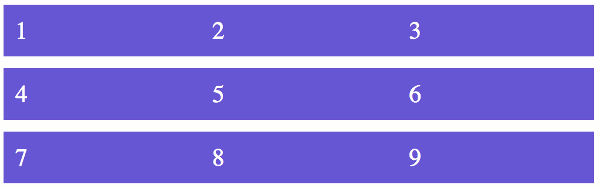
The grid-row-gap property sets the gutters between the rows only. You can use the grid-column-gap to set the gutters on the columns, or you can use the grid-gap shorthand property to set both the row gutters and the column gutters at the same time.
You can specify the gutter as a non-negative length or percentage value. Here are examples of some valid gutter declarations:
Syntax
Here's the official syntax of the grid-row-gap property:
Possible Values
normal-
The browser's default spacing is used.
- length-percentage
-
The length-percentage data type means that you can provide either a length or a percentage, where percentage will resolve to a length.
Negative values are invalid.
A percentage value is relative to the size of the grid container.
In addition, all CSS properties also accept the following CSS-wide keyword values as the sole component of their property value:
initial- Represents the value specified as the property's initial value.
inherit- Represents the computed value of the property on the element's parent.
unset- This value acts as either
inheritorinitial, depending on whether the property is inherited or not. In other words, it sets all properties to their parent value if they are inheritable or to their initial value if not inheritable.
Basic Property Information
- Initial Value
normal- Applies To
- Grid containers
- Inherited?
- No
- Media
- Visual
- Animation type
- As length, percentage, or calc (see example)
CSS Specifications
- The
row-gapproperty (for whichgrid-row-gapis an alias) is defined in CSS Box Alignment Module Level 3.
Browser Support
Browser support for CSS properties can vary, particularly for newer or experimental features. Check current browser compatibility before using a property in production, especially when supporting older browsers.
The following table provided by Caniuse.com shows the level of browser support for this feature.
Initial Value
CSS properties have an initial value that applies when the property has not been explicitly set. The initial value is different from the value inherited from a parent element and may vary between properties.
Inheritance
Some CSS properties inherit their computed value from their parent element by default, while others do not. The inherit, initial, unset, and revert keywords can also be used to control how a property gets its value.
Vendor Prefixes
Most modern CSS properties use the standard, unprefixed syntax. Vendor-prefixed properties such as -webkit- are mainly relevant to older browser versions or specific features and should only be used when required by your browser support targets.