
CSS font-kerning
The font-kerning property is used for the contextual adjustment of inter-glyph spacing.
Kerning is a typographic term that refers to the adjustment of space between two specific characters. These two characters are referred to as a kerning pair. Kerning is often done when there's too much space between two characters, but it can also be done when there's not enough space. Kerning adjusts the spacing to be optically correct.
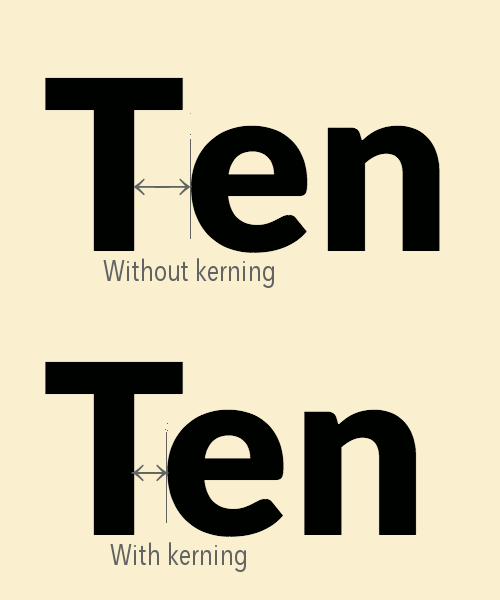
The bottom word has had kerning applied to it. Notice that it has a much more even space distribution between all three letters than the top example (which has had no kerning applied).
Certain characters can cause spacing issues that only manifest when paired with another potentially problematic character. The letter pairs that most often need kerning tend to be combinations of uppercase and lowercase characters, as well as pairs containing punctuation. So pairs like "To", "Te", "Ve", "w.", etc, are good kerning candidates.
Note that it's not the single character that causes the issue. It's the pair that causes the issue. While a certain character might be prone to spacing issues, those issues will only manifest when paired with certain other characters. For example, the uppercase pair "AV" often causes problems, but "AI" doesn't. So words like "AVAIL" have the potential to look a bit uneven with its spacing.
Most good fonts have a built-in kerning table that list specific letter pairs and the spacing adjustments that should be applied to them. A high quality font typically comes with between 500 and 1000 kerning pairs, so kerning is often applied automatically. However there may be cases where you don't want kerning to be applied automatically. You can use the font-kerning property to enable or disable kerning as required.
Syntax
The syntax of the font-kerning property is:
Possible Values
auto- Specifies that kerning is applied at the discretion of the user agent.
normal- Specifies that kerning is applied.
none- Specifies that kerning is not applied.
In addition, all CSS properties also accept the following CSS-wide keyword values as the sole component of their property value:
initial- Represents the value specified as the property's initial value.
inherit- Represents the computed value of the property on the element's parent.
unset- This value acts as either
inheritorinitial, depending on whether the property is inherited or not. In other words, it sets all properties to their parent value if they are inheritable or to their initial value if not inheritable.
General Information
- Initial Value
auto- Applies To
- All elements
- Inherited?
- Yes
- Media
- Visual
- Animatable?
- No
Example Code
Official Specifications
- CSS Fonts Module Level 4
- CSS Fonts Module Level 3 (W3C Recommendation 20 September 2018)
Browser Support
Browser support for CSS properties can vary, particularly for newer or experimental features. Check current browser compatibility before using a property in production, especially when supporting older browsers.
Initial Value
CSS properties have an initial value that applies when the property has not been explicitly set. The initial value is different from the value inherited from a parent element and may vary between properties.
Inheritance
Some CSS properties inherit their computed value from their parent element by default, while others do not. The inherit, initial, unset, and revert keywords can also be used to control how a property gets its value.
Vendor Prefixes
Most modern CSS properties use the standard, unprefixed syntax. Vendor-prefixed properties such as -webkit- are mainly relevant to older browser versions or specific features and should only be used when required by your browser support targets.