
Expandable Rows Table Template
Keep your tables clean and scannable by hiding secondary information in expandable rows.
With a single click, users can reveal a hidden row containing more details, perfect for order summaries, user profiles, or any data with primary and secondary importance.
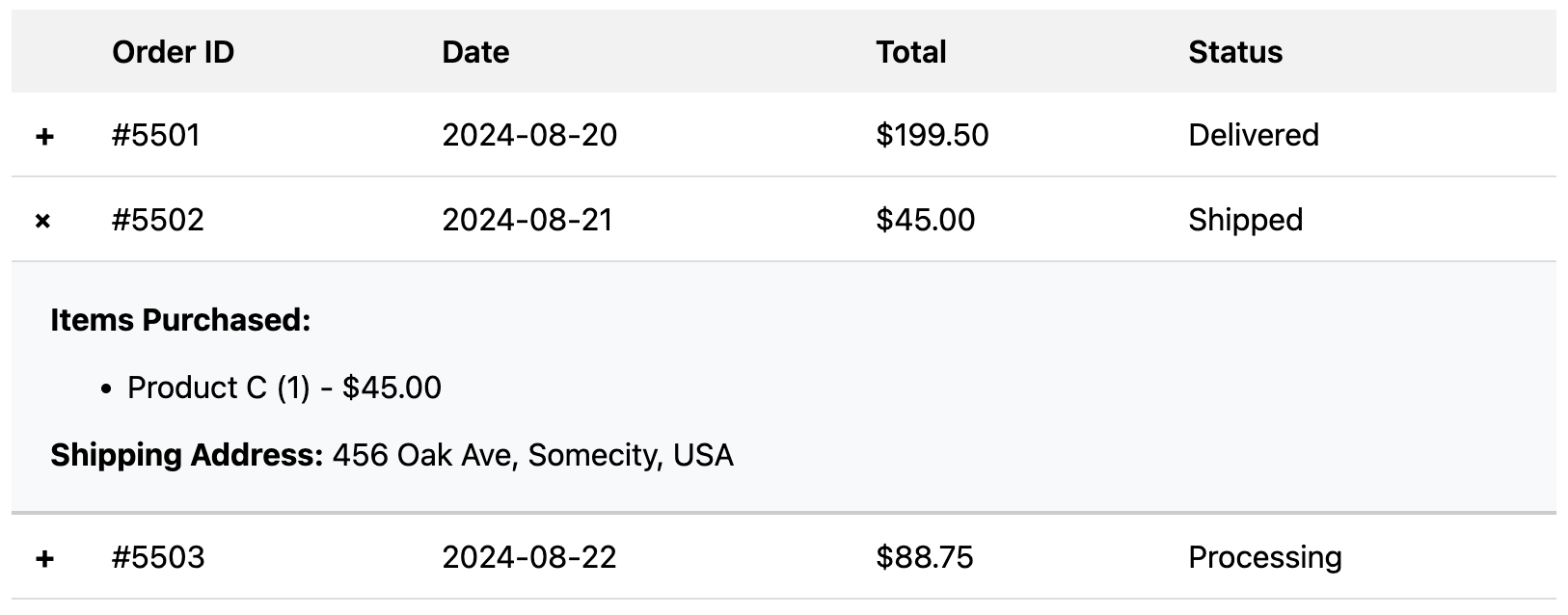
About this Expandable Table
This "accordion" or "expandable row" pattern is a fantastic way to manage information density. The main table shows only the most critical data. A dedicated hidden row, placed directly after a main row in the HTML, contains additional details.
The JavaScript logic is simple:
- When a user clicks on a main row (specifically, one with the class
.row-expandable), the script finds the very next row in the DOM. - It then toggles a "visible" class on that next row, which changes its
displayproperty. - A class is also toggled on the clicked row, which triggers a CSS transform on the
+icon, rotating it 45 degrees to look like anx(the close symbol). This could easily be modified to switch between+and-if you prefer.
The expandable row itself contains a td with a colspan attribute, allowing its content to span the full width of the table, perfect for displaying free-form details.
Features
- Keeps UI Clean: The primary table view remains uncluttered and easy to scan.
- On-Demand Detail: Provides rich information to the user without navigating to a new page.
- Smooth Transitions: Uses CSS transitions for a smooth opening and closing effect.
- Self-Contained: Built with simple, dependency-free JavaScript.
Ideal Use Cases
- E-commerce order history, where clicking an order reveals the specific products purchased.
- User lists, where clicking a user reveals their full profile or bio.
- Project management tables, where clicking a task reveals sub-tasks or comments.
Code
Here's the full code, including the HTML structure, CSS for the effect, and JavaScript to manage the state:
<style>.expandable-table { width: 100%; border-collapse: collapse; font-family: system, BlinkMacSystemFont, "Segoe UI", Roboto, "Helvetica Neue", Arial, sans-serif;}.expandable-table thead th { padding: 12px; background-color: #f2f2f2; text-align: left; font-weight: 600;}.expandable-table tbody td { padding: 12px; border-bottom: 1px solid #ddd;}/* This is the row the user clicks on */.expandable-table .row-expandable { cursor: pointer; transition: background-color 0.2s;}.expandable-table .row-expandable:hover { background-color: #f8f9fa;}/* This is the row that is hidden/shown */.expandable-table .row-details { display: none; /* Hidden by default */}.expandable-table .row-details.visible { display: table-row; /* Show it when it has the 'visible' class */}.expandable-table .row-details td { background-color: #f8f9fa; padding: 20px; border-bottom: 2px solid #ccc; /* A thicker border to separate it */}/* Styling for the expand/collapse icon */.expandable-table .expand-icon { font-weight: bold; transition: transform 0.3s ease; display: inline-block;}.expandable-table .row-expandable.open .expand-icon { transform: rotate(45deg);}</style><table class="expandable-table" id="myExpandableTable"> <thead> <tr> <th scope="col" style="width: 5%;"></th> <th scope="col">Order ID</th> <th scope="col">Date</th> <th scope="col">Total</th> <th scope="col">Status</th> </tr> </thead> <tbody> <!-- First Record --> <tr class="row-expandable"> <td><span class="expand-icon">+</span></td> <td>#5501</td> <td>2024-08-20</td> <td>$199.50</td> <td>Delivered</td> </tr> <tr class="row-details"> <td colspan="5"> <div> <strong>Items Purchased:</strong> <ul> <li>Product A (1) - $99.50</li> <li>Product B (2) - $100.00</li> </ul> <strong>Shipping Address:</strong> 123 Main St, Anytown, USA </div> </td> </tr> <!-- Second Record --> <tr class="row-expandable"> <td><span class="expand-icon">+</span></td> <td>#5502</td> <td>2024-08-21</td> <td>$45.00</td> <td>Shipped</td> </tr> <tr class="row-details"> <td colspan="5"> <div> <strong>Items Purchased:</strong> <ul> <li>Product C (1) - $45.00</li> </ul> <strong>Shipping Address:</strong> 456 Oak Ave, Somecity, USA </div> </td> </tr> <!-- Third Record --> <tr class="row-expandable"> <td><span class="expand-icon">+</span></td> <td>#5503</td> <td>2024-08-22</td> <td>$88.75</td> <td>Processing</td> </tr> <tr class="row-details"> <td colspan="5"> <div> <strong>Items Purchased:</strong> <ul> <li>Product D (3) - $75.00</li> <li>Product E (1) - $13.75</li> </ul> <strong>Shipping Address:</strong> 789 Pine Ln, Otherville, USA </div> </td> </tr> </tbody></table><script>/** * Enables expandable/collapsible rows for a table. * @param {string} tableId The ID of the table. */function enableExpandableRows(tableId) { const table = document.getElementById(tableId); if (!table) return; table.addEventListener('click', function(e) { // Find the closest ancestor 'tr' that is expandable const expandableRow = e.target.closest('tr.row-expandable'); if (!expandableRow) return; // Find the very next TR element, which is the details row const detailsRow = expandableRow.nextElementSibling; if (detailsRow && detailsRow.classList.contains('row-details')) { expandableRow.classList.toggle('open'); detailsRow.classList.toggle('visible'); } });}// Initialize the functionalityenableExpandableRows('myExpandableTable');</script>