
How Websites Work
This tutorial provides a high-level overview of how websites work. If you're about to create your first website, this article will help you understand how everything fits together. The tutorial contains the following lessons:
- (current page)
- Web Page Content
- Web Protocols
- Web Addresses
- How DNS Works
What is a Website?
A website is a collection of web pages. These web pages are usually located on a web server that is connected to the Internet. The web server is a computer that has been built specifically to host websites, and contains web server software.
The web server is usually located with a web hosting provider (a company that provides web hosting to its customers).
What Happens When I view a Website?
The following diagram demonstrates what happens each time you view a website:
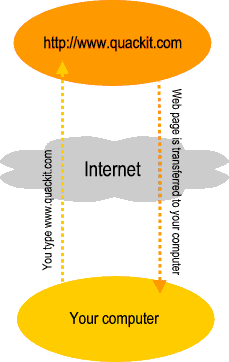
This diagram is only a simplistic version of what happens, but the key point is that, each time you view a web page in your browser, you initiate a request across the Internet to a web server. This is true even if you view multiple pages from the same website - each new page is a new request.
Actually, in most cases, each web page results in multiple requests. This is because most web pages consist of more than one file (or "resource"). Therefore, if a page contains 3 images, there will be at least 4 requests; 1 for the web page, and 1 for each image.
So, for example, if you type "www.quackit.com" into your browser, the following files might be requested:
- https://www.quackit.com/index.cfm
- https://www.quackit.com/images/image_1.png
- https://www.quackit.com/images/image_2.png
- https://www.quackit.com/images/image_3.png
In this case there are 3 images (called "image_1.png", "image_2.png", and "image_3.png") located in a directory called "images".
It's important to note that each file - including the web page file (index.cfm) - needs to be downloaded to your computer before you can view it. That's why you may sometimes see a web page appear without the images first, then one by one, the images appear. Larger images will take longer to appear because they take longer to download. This is why the speed of your Internet connection is important - a slower connection will make many websites appear slower (especially those with lots of images).