
2 Ways to Create Websites
There are different ways of creating websites. Two of the most common ways are:
- Method 1: Use an online website builder (requires no technical knowledge)
- Method 2: Code your own website (this is the more "technical" method)
Here's an overview of each method.
Method 1: Use an Online Website Builder
Example: Website Tonight! >>
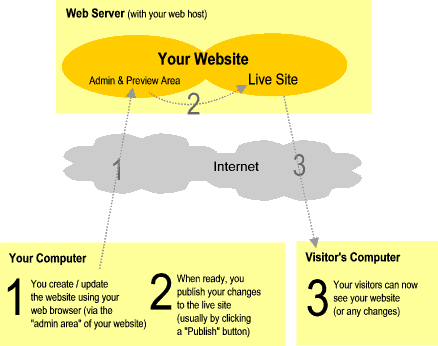
Using this method, your web host provides you with an online website builder, which you access with your browser. The web builder is usually attached to your administration area (which is provided by your web host when you first open your hosting account).
Online website builders are usually very easy to use so, no technical knowledge is required. You can usually preview your changes before publishing them.
Here's a diagram of the process:
Some advantages of this method include:
- No technical skills are required - You don't need to know any technical stuff.
- Takes less time - Many online website builders enable you to publish a website within minutes! All you need to do is select a template, add content, then publish.
- Not much to learn - Online website builders are often very easy to use.
Some disadvantages of online website builders include:
- Less flexibility - You might find yourself restricted with what you can do with your website (from both a design and a functionality perspective). Having said this, some website builders include heaps of templates and functionality so, unless you've got very specific requirements, this might not be an issue.
- Less portable - If you decide to change hosting providers, you may need to rebuild your website from scratch. However, this might not always be the case, so if you're concerned about this, check with your hosting provider first.
If you'd like to try an online website builder, check out Website Tonight. This is an easy to use website builder, which includes hosting, and plenty of extras.
I've also written an article about Website Tonight, highlighting its many features.
Method 2: Code Your Own Website
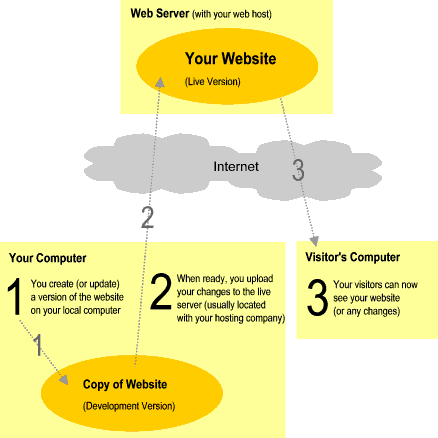
Using this method, you develop the website on your own computer, using specialized software (such as HTML editor, graphics software, etc). Then when you're happy with the changes, you upload it to your hosting provider (usually via FTP). At that stage, your changes are able to be viewed by your visitors.
Here's a diagram of the process:
Some advantages of this method include:
- More flexibility - You can make any change to your website that you wish - no matter how advanced (as long as you have the skills!).
- More portable - If you decide to change hosting providers one day, things will probably be easier if you have developed the website yourself. This is because your code doesn't rely on a system that might only reside at your current web host. Therefore, you should be able to simply, take a copy of your website and upload it to the new hosting provider.
Some disadvantages of coding your own website include:
- Requires technical skills - You need to know lots of technical stuff. This might not suit everybody.
- Requires more time - In general, coding your own website will take longer than using an online website builder.
- Learning curve - You need to take the time and effort to learn the skills.
If you'd like the idea of coding your own website, check out my tutorial on how to make your own website.