
Web Page Content
A web page is simply a text file. The text file contains text and markup code that specifies what should appear when viewed with a web browser. When you view the page with your web browser, the web browser renders the markup code (it displays as intended), instead of just outputting the code (browsers know to do this). Behind the scenes, the web page looks different to what you see in your browser. When you view the file with a text editor or HTML editor, you'll see the HTML tags (as written by the programmer).
Below is an example of a what a web page looks lke "behind the scenes". This is what a web page looks like if you open it up using a text editor (such as Notepad, SimpleText, etc):
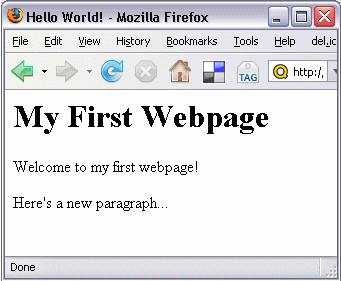
And here's what it looks like when you view it using a web browser (such as FireFox, Internet Explorer, etc):
How Does a Web Page Embed Images?
Like most other content on a web page, website authors embed images using a basic line of code. The code for embedding images looks something like this:
The code requires one thing: That the image actually exists at the location that is specified in the src="..." attribute. Therefore, for a web page to contain 3 images, the 3 images need to exist on the server too (as well as the web page containing the code).
When visitors request the web page, the page and all images are downloaded to their computer and displayed in their browser.
Linking Between Web Pages
Most web pages contain links to other web pages. These can be internal links (to another page on the same website), or external links (to a page on another website).
Either way, it's just as easy for web authors to create external links as it is to create internal links. The same code is used regardless - it's just the URL that changes.
Authors can create a link using a single line of code. Here's an example of what the code looks like:
Other Web Page Content
Any other content on the web page is made up of a combination of text and code, most of which looks somewhat similar to the above image code.
For example, the following code:
The <a...>, <img...> and <b> are referred to as HTML tags.
You can learn more about creating websites with this tutorial on how to make your own website.