
SQL Server - Linked Servers
If you've been navigating around SQL Server Management Studio (SSMS), you may have come across the Linked Servers option.
The Linked Servers option allows you to connect to another instance of SQL Server running on a different machine, perhaps remotely in a different city/country. This can be useful if you need to perform distributed queries (query a remote database). Setting up a linked server is quite straight forward in SSMS, all you need is details of the remote server, and the database that you need to query.
Creating a Linked Server
To create a linked server:
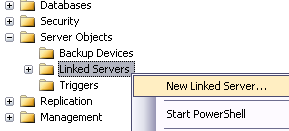
- Navigate to Server Objects > Linked Servers
- Right click on Linked Servers and select New Linked Server.... Like this:
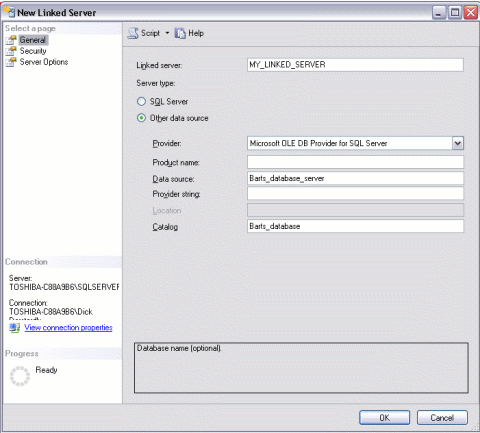
- Complete the details for the linked server. In this example, Data source refers to the name of the SQL Server machine ("Barts_database_server"), Catalogue refers to the name of the database ("Barts_database"). You can also configure options in the other two tabs depending on your requirements.
Distributed Queries
Once you have configured your linked server, you will be able to run queries etc against it. When you run a query against a linked server, it is referred to as a distributed query.
When you execute a distributed query against a linked server, you must include a fully qualified, four-part table name for each data source to query. This four-part name should be in the form linked_server_name.catalog.schema.object_name.
Here's an example:
This example is based on the linked server example above. It assumes that the remote database has a schema called "Person" and a table called "Enemy".