
Change MySpace URL
How would you like your MySpace page to be located at something like: "www.mycoolname.com"?
Well, now it can be!
Cool! How do I do that?
It's easy! All you need to do is register your own domain name.
Once you've registered your domain name, you can then "forward" it to your MySpace profile page. You can also "mask" your domain name so that the address doesn't change to the MySpace URL when it's forwarded.
You can register domain names through ZappyHost for between $7 - $15. By the way, once you've registered your own domain name, nobody else in the world can use it!
If you're in a band, this is essential. The last thing your band needs is for someone else to register "www.yourbandname.com"...
Step By Step...
Here's what you need to do to change your MySpace URL:
Step 1. Register a Domain Name
- Think up a cool domain name.
- Check if the domain name is available (i.e. nobody else has registered it). You can do this using ZappyHost. If the domain name isn't available, ZappyHost will suggest some alternatives.
- Once you find an available domain name, register it. Again, you can do this through ZappyHost. Registering your selected domain name is simply a matter of clicking the "Continue" button, completing the form, and paying either by PayPal or credit card.
If you don't have much time, you could do the remaining steps later. The main thing is that you've now secured your very own domain name - nobody else can register it!
Step 2. Configure Domain Forwarding & Masking
OK, now that you've registered your domain name, you can set up domain forwarding.
This step configures your domain name so that, when a user types it in their browser, they are redirected (or "forwarded") to another URL.
- Open ZappyHost.com and log in using the "My Account" link. Your log in details will have been emailed to you when you purchased your domain name. If you haven't seen the email, check your spam folder.
- Click "Manage Domains"
- You should see your domain name listed on the screen. Click it.
- Click "Forward" (or "Forwarding").
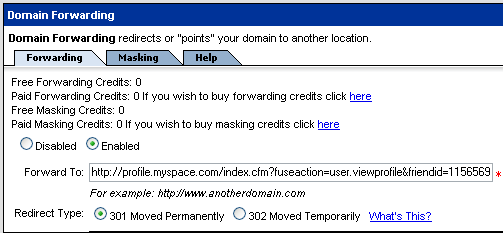
- You'll see a "Forwarding" tab. Within it, select "Enabled", enter the MySpace URL your domain should forward to, and select a "Redirect Type". Like this:
Step 3. Configure Domain Masking
This step configures your domain name so that, when the browser is forwarded to the new URL, the user still sees your domain name in their browser (not the new URL).
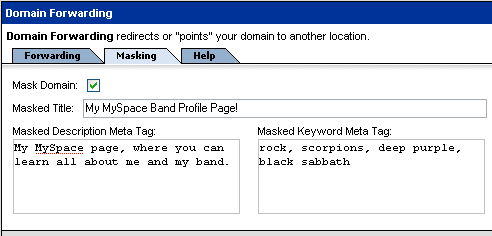
- Staying on the screen outlined in the previous step, select the "Mask" tab
- Within this tab, check "Mask Domain", complete the other fields, then click "OK". Domain masking configures it so that your domain name remains in the browser's address bar (i.e. it doesn't just redirect to the MySpace URL, it redirects but users only see your domain name).
That's all there is to changing your MySpace URL to your own domain name.
So go ahead, change your MySpace URL now!.
Added Benefits Of Domain Names
There are some excellent benefits to be had from registering your own domain name.
One great benefit is that it's more permanent. Once you've registered your own domain name, nobody else can register it. As long as you renew it each year, it is yours to use as you wish.
This means you can point it to your website/page today, and if things change in the future, you can update it to point to a new address. Users only need to know the one domain name. This is perfect for websites like MySpace because, as a MySpace user, you have no control over MySpace. They could change things tomorrow and you can't do anything about it.
For example, what would you do if MySpace changed their URL format? This may seem unlikely, but these kinds of things do happen occasionally. It happened when mp3.com got sold. In cases like this, if you had been using your own domain name, it would still work. All you would need to do is point your domain name to the new location.
This is especially important if you have a product or service to promote. For example, if you have a band, you will want to advertise your band's URL at every opportunity. You might even print it on CD sleeves etc. Having your very own URL allows you to advertise it with full confidence that it won't suddenly change in the future.
Tip - Multiple Domain Names
Many individuals and businesses register variations extensions of the same name, such as .com, .org, .net etc. You can register as many variations as you wish - there's no limit to how many domain names you can register. For example, you could get "mycoolname.com", "mycoolname.org", "mycoolname.net", "mycoolname.info" etc.
You could also register variations on the name, such as "mycoolname", "mycoolnameonline", "myname", "mynameonline", "my-cool-name" etc
Many businesses do this to protect their business from competitors who could snap up a similar domain name.
So, go ahead...