HTML Attributes: What they are and How to use
HTML attributes can be added to HTML elements to provide further information about that element.
HTML tags can contain one or more attributes. Attributes are added to a tag to provide the browser with more information about how the tag should appear or behave. Attributes consist of a name and a value separated by an equals (=) sign.
Example
Consider this example:
This example uses the <abbr> tag, which is used to indicate an abbreviation or acronym. But something extra has been added to the tag — an attribute. This particular attribute (the title attribute) provides a title for the element.
The name of the attribute is title. In this example, we've given it a value of Hypertext Markup Language.
The title attribute can (optionally) be used on any HTML element to provide extra information about the element's contents. When used with the <abbr> tag, it allows use to provide an expansion of the abbreviation or acronym (i.e. we can say what the acronymn stands for).
When using the title attribute, most browsers will display its value as a "tooltip" when the user hovers over the element.
Multiple Attributes
You can add more than one attribute to a given element.
Here's an example of adding two attributes to the <a> element (which is used for creating a hyperlink to another web page).
The href attribute specifies the location of the web page that we're linking to.
We also use the title attribute to provide some advisory text — just in case the user didn't already know ;)
More Attributes
There are many different attributes available to HTML elements. Here are some attributes that you'll often encounter on any modern website:
class- Used with Cascading Style Sheets (CSS) to apply the styles from a given class.
style- Used with CSS to apply styles directly to the element (i.e. inline styles).
title- As seen above, can be used to display a "tooltip" for your elements. You supply the text.
Some attributes can be used on every HTML element (full list here), some are available on many (but not all) elements, while other attributes are only available on one specific element.
I've put together an alphabetical list of HTML tags. When you click through to each tag, you can see all the attributes that can be used with that tag, as well as an explanation about each attribute.
But there are a lot of attributes and you don't need to memorize them just yet. The good thing about attributes is that, in most cases, they are optional.
Many HTML elements assign a default value to its attributes — meaning that, if you don't include that attribute, a value will be assigned anyway. Having said that, some HTML tags do require an attribute (such as the hyperlink example above).
You will see more attributes throughout this tutorial.
Code Assist
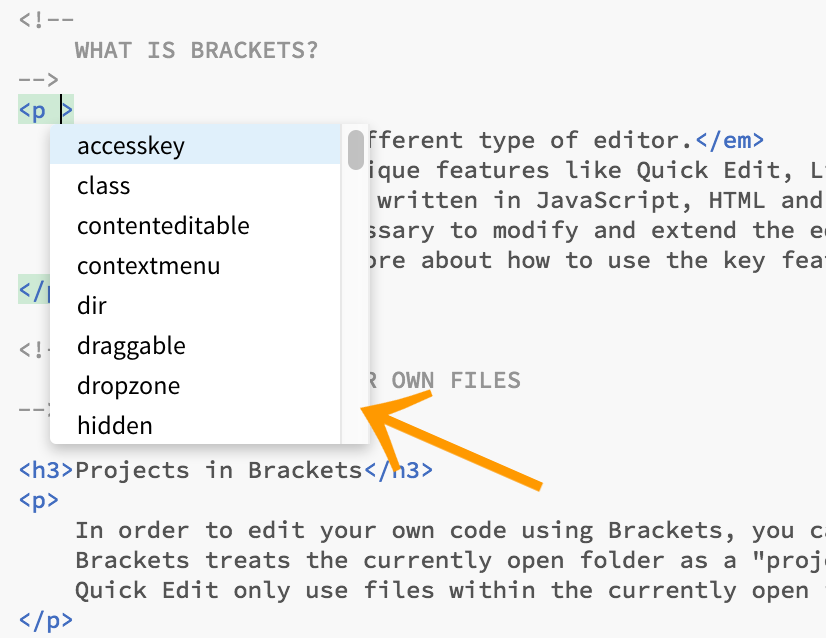
Many HTML editors provide a "code assist" feature, which presents all available attributes when you begin to enter an HTML tag.
This can help tremendously, and saves you from having to memorize every single attribute available for every single element.