
CSS Scrollbars
CSS provides options for handling content that extends beyond its containing box.
Customize the Scrollbar
Over the years, browser manufacturers have implemented their own means for customizing the appearance of scrollbars.
WebKit Browsers
If you're using a WebKit browser, you will see that the following scrollbars have been styled using WebKit extensions. See HTML scrollbars for more examples.
WebKit based browsers such as Chrome, Safari, and Opera can take advantage of the various -webkit- scrollbar pseudo-elements and pseudo-classes.
These allow you to customize all aspects of a scrollbar — from its color, to its size, shadows, and more.
Pseudo-Elements
Here are the WebKit pseudo-elements for styling scrollbars:
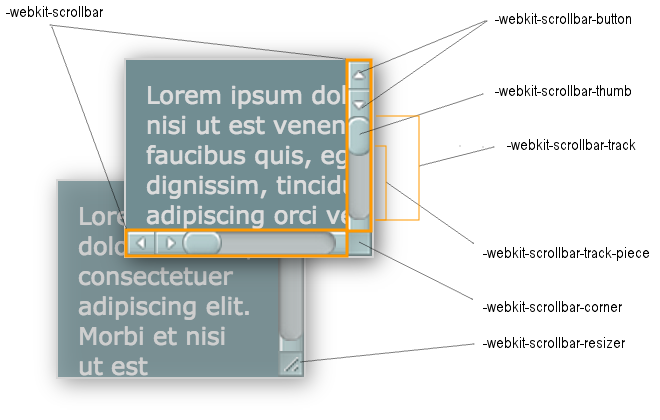
::-webkit-scrollbar::-webkit-scrollbar-button::-webkit-scrollbar-track::-webkit-scrollbar-track-piece::-webkit-scrollbar-thumb::-webkit-scrollbar-corner::-webkit-resizer
And here's where they fit within a scrollbar:
Pseudo-Classes
Here are the WebKit scrollbar pseudo-classes as outlined on the WebKit blog:
:horizontal- Applies to any scrollbar piece that has a horizontal orientation.
:vertical- Applies to any scrollbar piece that has a vertical orientation.
:decrement- Applies to buttons and track pieces. It indicates whether or not the button or track piece will decrement the view's position when used (e.g., up on a vertical scrollbar, left on a horizontal scrollbar).
:increment- Applies to buttons and track pieces. It indicates whether or not the button or track piece will decrement the view's position when used (e.g., up on a vertical scrollbar, left on a horizontal scrollbar).
:start- Applies to buttons and track pieces. It indicates whether the object is placed before the thumb.
:end- Applies to buttons and track pieces. It indicates whether the object is placed after the thumb.
:double-button- Applies to buttons and track pieces. It is used to detect whether a button is part of a pair of buttons that are together at the same end of a scrollbar. For track pieces it indicates whether the track piece abuts a pair of buttons.
:single-button- Applies to buttons and track pieces. It is used to detect whether a button is by itself at the end of a scrollbar. For track pieces it indicates whether the track piece abuts a singleton button.
:no-button- Applies to track pieces and indicates whether or not the track piece runs to the edge of the scrollbar, i.e., there is no button at that end of the track.
:corner-present- Applies to all scrollbar pieces and indicates whether or not a scrollbar corner is present.
:window-inactive- Applies to all scrollbar pieces and indicates whether or not the window containing the scrollbar is currently active.
You can also use the CSS :enabled, :disabled, :hover and :active pseudo-classes with the various scrollbar pieces.
Internet Explorer
Microsoft implemented a bunch of proprietary CSS properties for customizing the color of scrollbars. They are:
scrollbar-base-colorscrollbar-3dlight-colorscrollbar-arrow-colorscrollbar-track-colorscrollbar-darkshadow-colorscrollbar-face-colorscrollbar-highlight-colorscrollbar-shadow-color
Microsoft also added -ms- prefixed versions of these properties that can be used as a synonym for the other properties (eg, -ms-scrollbar-base-color can be used as a synonym for scrollbar-base-color in IE8 Standards mode).
Forcing Scrollbars
Scrollbars can appear in the usual place such as the browser window or on a <textarea> tag. But you can also force scrollboxes onto other elements whenever their contents become too large to fit inside the box.
You can use CSS to create your own "inline scrollbars" by creating a box smaller than its contents. You can do this using the overflow property. Specifically, you can use overflow:scroll to force scrollbars to appear when the content overflows. This has an effect similar to inline frames (but using CSS is much simpler).
The above WebKit example on this page uses this technique. Here it is again but this time using inline styles and without all the scrollbar customization.
The overflow property tells the browser what to do if the box's contents is larger than the box itself. You can also specify auto, which will hide the scrollbars if the content doesn't overflow, but display them if the content does overflow. You can also use hidden to hide contents that don't fit into the box and visible to automatically expand the box to fit the contents (this is the default setting)