
About GIMP
This page provides a short overview of the GIMP application.
What is GIMP?
GIMP stands for GNU Image Manipulation Program (formerly General Image Manipulation Program). GIMP is a free graphics editing package. It is typically used to do things like:
- Touch up photos
- Resize graphics
- Scan photos
- Create logos
- Create animated GIFs
- Export graphics to web format
- ...and much more
It's basically a free alternative to Adobe Photoshop. Most of the things you can do in Photoshop you can do in GIMP.
What does GIMP look like?
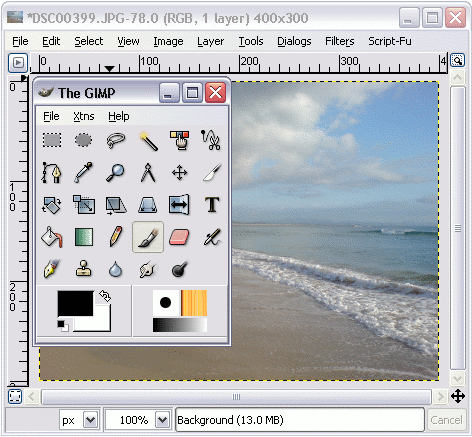
Here's what GIMP looks like in normal editing view. There are many other dialogs that you can bring up depending on what your task is, but this is the basic view. We will be looking at some of the other dialogs later in the tutorial.
Features & Capabilities
GIMP is loaded with features. If you've ever worked with commerical programs like Photoshop, you'll be familiar with many of GIMP's features.
Below are some of the main features of GIMP. Don't worry if you've never heard of these features - we'll be covering many of them in this tutorial.
- Painting tools including:
- Brushes
- Pencil
- Airbrush
- Cloning tool
- ...and more
- Transformation tools including:
- Rotate
- Scale
- Shear
- Flip
- Selection tools, including:
- Rectangle
- Ellipse
- Free
- Fuzzy
- Bezier
- Intelligent scissors
- Layers and channels
- Advanced scripting capabilities
- Full Alpha channel support for working with transparency
- Multiple undo/redo (limited only by disk space)
- Tile-based memory management, so image size is limited only by available disk space
- Sub-pixel sampling for all paint tools for high-quality anti-aliasing
- A procedural database for calling internal GIMP functions from external programs, such as Script-Fu
- Support for a wide range of file formats, including GIF, JPEG, PNG, XPM, TIFF, TGA, MPEG, PS, PDF, PCX, BMP and many others
- Plug-ins that allow for the easy addition of new file formats and new effect filters.