
SQL Server 2016: Create a Stored Procedure
A stored procedure is a group of SQL statements compiled into one. Stored procedures can include business logic and other programming constructs.
In SQL Server, a stored procedure is a group of one or more Transact-SQL statements or a reference to a Microsoft .NET Framework common runtime language (CLR) method.
Programmability
But a stored procedure is more than just a long script. It's a script that has been saved in SQL Server specifically under the Stored Procedures node, and it can:
- Accept input parameters (and return multiple values in the form of output parameters to the calling program).
- Contain programming statements.
- Return a status value to a calling program to indicate success or failure, and the reason for any failure.
Stored procedures often contain business logic. For example, a stored procedure can accept parameters that are passed to it and test against those parameters using IF statements. Eg, if the parameter is one value, do this, if it's another value, do that.
Stored procedures can improve performance in an application, because the stored procedure is parsed and optimized as soon as it's created, and then stored in memory. Running a conditional query via stored procedure can be extremely quick - compared to an application that sends a query across the network, to the SQL Server, then has all the data returned to it across the network so it can filter through it, and pick out only the records it's interested in.
Benefits of Stored Procedures
Here are some of the main benefits in using stored procedures:
| Benefit | Explanation |
|---|---|
| Modular programming | You can write a stored procedure once, then call it again and again, from different parts of an application (and even from multiple applications). |
| Performance | Stored procedures provide faster code execution and reduce network traffic.
|
| Security | Users can execute a stored procedure without needing to execute any of the statements directly. Therefore, a stored procedure can provide advanced database functionality for users who wouldn't normally have access to these tasks, but this functionality is made available in a tightly controlled way. |
How to Create a Stored Procedure
To create a stored procedure, use the CREATE PROCEDURE statement, followed by the code that makes up the stored procedure. If your stored procedure is going to accept parameters, they need to be included after the name.
We'll now create a stored procedure based on one of the views that we created earlier — the RecentAlbums view.
This view returns all albums released in the last 20 years. This is fine as long as it will only ever need to look back 20 years. But what if you want the user to choose how many years it should cover?
A stored procedure can solve this problem.
We will create a stored procedure that accepts a parameter. The value of the parameter will be the number of years to search back over. Therefore, this value can be specified by the user whenever they execute the stored procedure.
-
Design the Stored Procedure
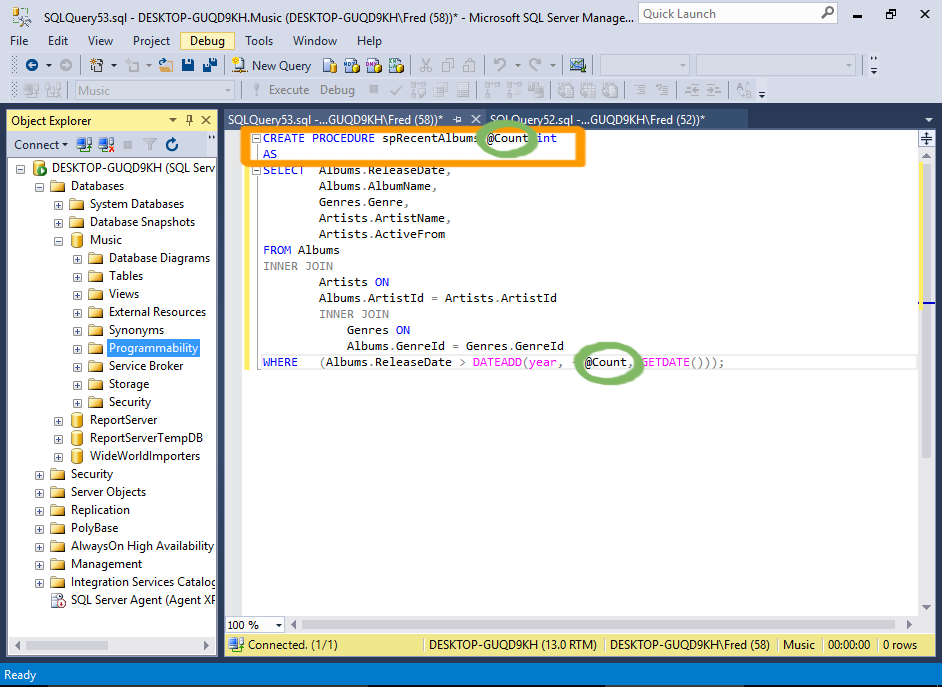
Open a new query window and add the code for the stored procedure.
In our case, we will copy/paste the code from the RecentArtists view and modify the top part, so that it becomes a stored procedure.
We will add a parameter called
@Countthat will determine how many years the stored procedure should look back.So we will replace the hardcoded value of
20with@CountSample Code
Here's the code from our example:
-
Create the Stored Procedure
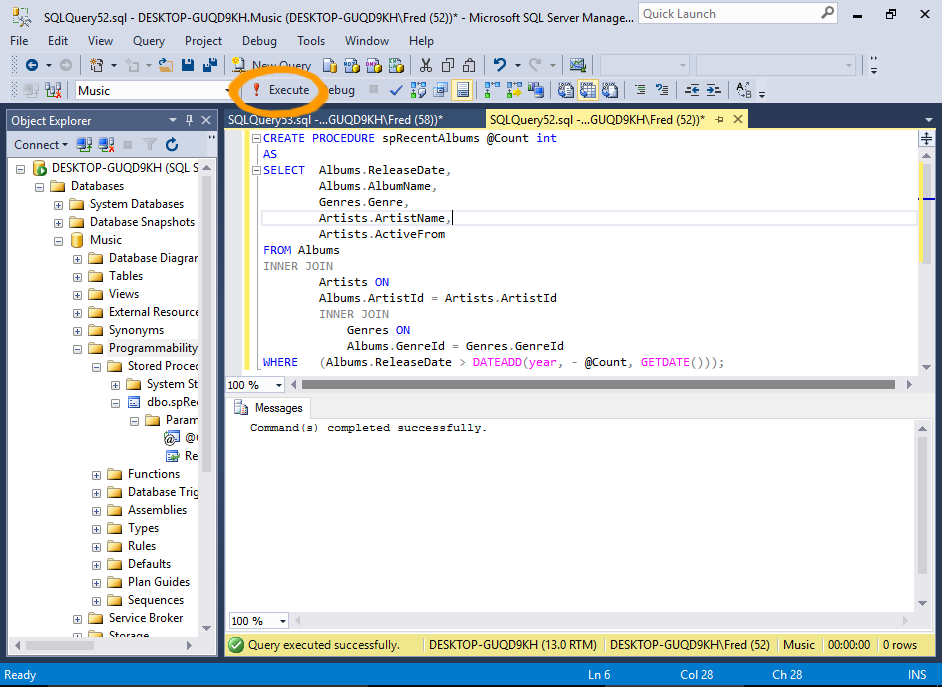
Once it all looks good, you can execute the statement to create the stored procedure.
Click Execute to create the stored procedure.
Once the stored procedure has been created, you can see it in the Object Explorer (you might need to refresh the Stored Procedures node first).
-
Execute the Stored Procedure
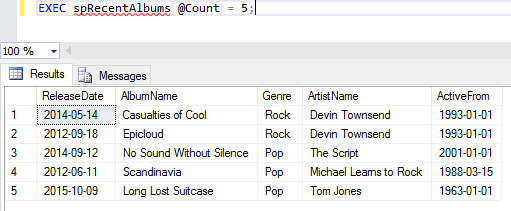
Now that it has been created, you can execute the stored procedure.
Open a new query window, add this:
EXEC spRecentAlbums @Count = 5;
Now click Execute from the toolbar.
The stored procedure will return all albums released in the last 5 years.
-
Try different Parameters
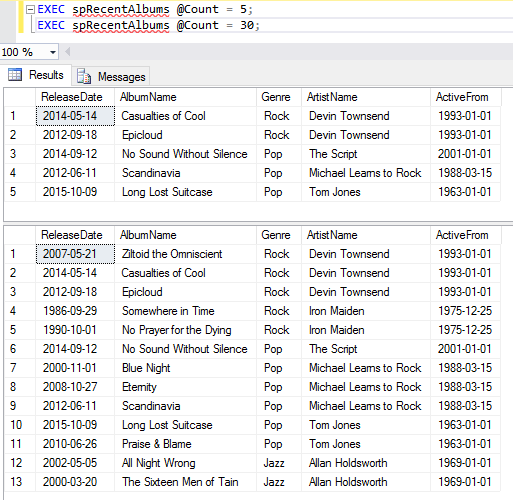
Try changing the value of the parameter to see how this affects the results.
You can also run multiple statements one after the other. A new results pane will appear for each statement.
Stored Procedure Template
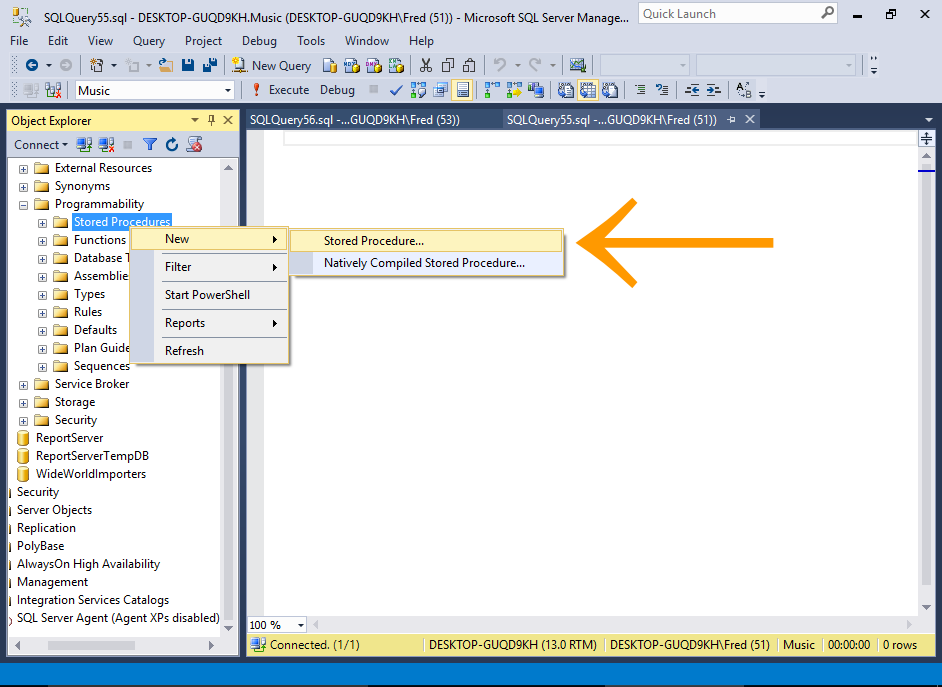
In SQL Server 2016, you can create a stored procedure by right-clicking on the Stored Procedures node in the Object Explorer and selecting New > Stored Procedure... or New > Natively Compiled Stored Procedure....
This will open a template that's ready to be populated with your own specific procedure.
Execute a Stored Procedure via the GUI
You can also use the graphical user interface to execute a stored procedure.
-
Launch the Execute Procedure Dialog Box
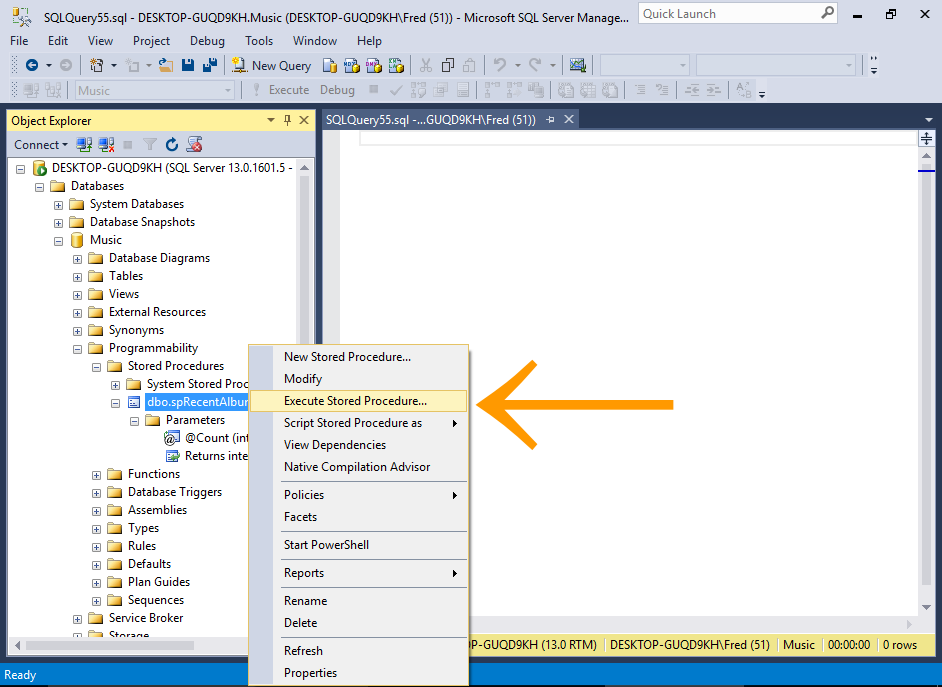
In the Object Explorer, right-click on the stored procedure and select Execute Stored Procedure....
-
Supply Parameters
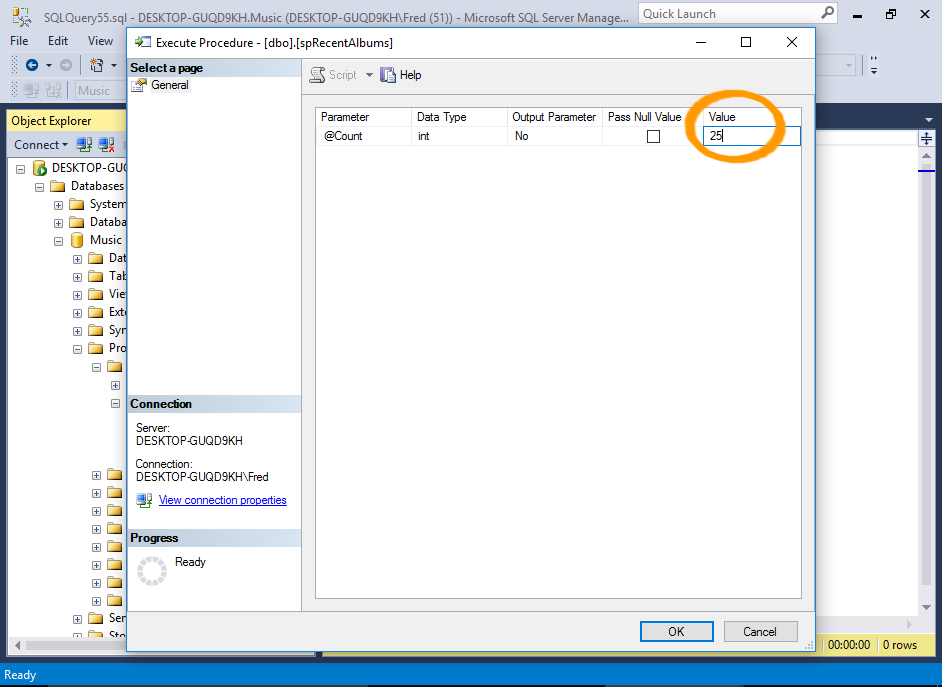
Enter a value for any parameters that the stored procedure requires, then click OK.
-
The Results
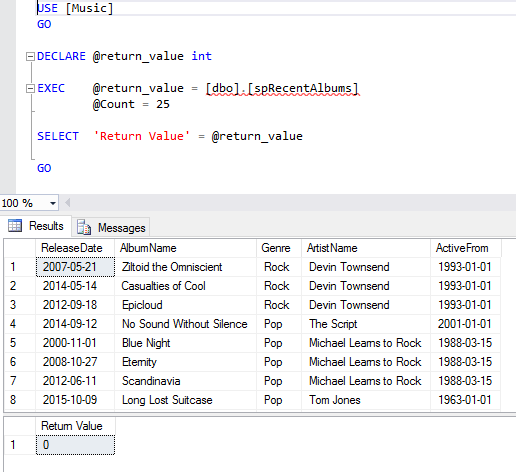
The results are displayed.
Modify a Stored Procedure
If you need to modify an existing stored procedure, simply replace CREATE with ALTER (along with the updated procedure).
This example modifies the stored procedure so that the results are sorted by release date in descending order:
System Stored Procedures
SQL Server includes a large number of system stored procedures to assist in database administration tasks. Many of the tasks you can perform via the GUI can be done via a system stored procedure. For example, some of the things you can do with system stored procedures include:
- Configure security accounts
- Set up linked servers
- Create a database maintenance plan
- Create full text search catalogs
- Add remote login
- Configure replication
- Set up scheduled jobs
- and much more...
System stored procedures are prefixed with sp_, so it's best to avoid using that prefix for your own procedures.
Naming Conventions
It is a good idea to develop a consistent naming convention for your stored procedures (and for all other objects in your database).
Some people prefix their stored procedures with usp_ (to indicate a user-defined stored procedure), others begin it with a SQL keyword such as select, insert, update, delete. Others use an abbreviation for the application.
Some use underscores to separate each word in the stored procedure (eg, recent_albums), while others will use title case (eg, RecentAlbums).
Therefore, it is possible that our stored procedure could been named any of the following, depening on the naming convention being used.
- RecentAlbums
- recent_albums
- uspRecentAlbums
- usp_recent_albums
- selectRecentAlbums
- select_RecentAlbums
- select_recent_albums
- getRecentAlbums
- get_recent_albums
You get the picture. The important thing is consistency. Choose one and stick with it. It will make it easier when you need to use a stored procedure. Imagine having scores, or even hundreds of stored procedures, and every time you go to execute one, you need to navigate to it in the Object Explorer purely because you can't remember whether you called it usp_RecentAlbums or uspRecentAlbums.
As mentioned, avoid using sp_ as the prefix for your stored procedure names. SQL Server uses this prefix for the system stored procedures.
SQL Server searches the system stored procedures first, so at best, you'll take a performance hit. At worst, your procedure won't run (if it shares a name with a system stored procedure).