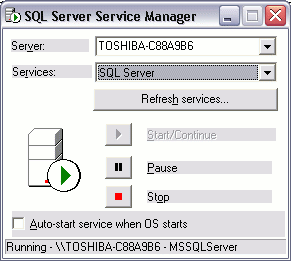
SQL Server Service Manager
Update
This page was written for SQL Server 2000. See SQL Server Tutorial for a more up to date SQL Server tutorial.
SQL Server Service Manager is used to start, stop, and pause the various components on SQL Server. These components run as Windows services.
The following services can be stopped/started/paused via the SQL Service Manager:
| Service | Description |
|---|---|
| SQL Server service | Implements the SQL Server database engine. There is one SQL Server service for each instance of SQL Server running on the computer. |
| SQL Server Agent service | Implements the agent that runs SQL Agent jobs and alerts. There's one SQL Agent service for each instance of SQL Server running on the computer. |
| Microsoft Search service | Implements the full-text search engine. There is only one full-text search engine regardless of how many instances of SQL Server are running on the computer. |
| MSDTC service | Manages distributed transactions. There is only one MSDTC service regardless of how many instances of SQL Server are running on the computer. |
| MSSQLServerOlAPService service | Implements the SQL Server Analysis Services. There is only one MSSQLServerOlAPService service regardless of how many instances of SQL Server are running on the computer. |
Using the SQL Server Service Manager
SQL Server Service Manager is a taskbar application. When SQL Server Service Manager is minimized, an icon  appears in the taskbar.
To use the Service Manager, you can either right click on the icon, or double click on the icon. Right clicking provides a menu of options, double clicking maximizes the Service Manager for you to select your options.