
SQL Server - Enterprise Manager
Update
Enterprise Manager has been superseded by SQL Server Management Studio.
Enterprise Manager is the main administration console for SQL Server.
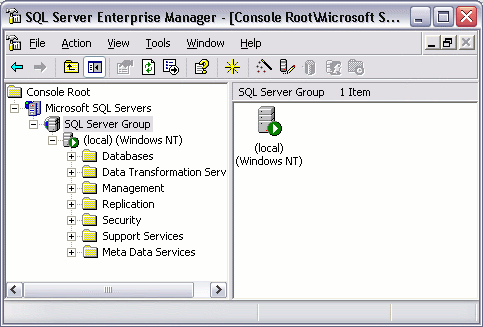
After looking at the above screenshot, those of you familiar with operating Windows servers will probably notice that Enterprise Manager sits within the Microsoft Management Console (MMC). For those who aren't familiar with MMC, MMC is the standard console for presenting administrative tools (such as the IIS web server) within Windows.
Enterprise Manager enables you to create database objects (such as databases, tables, views etc), you can configure user accounts, you can set up scheduled tasks, transfer data between databases, and more.
You can use Enterprise Manager to connect to as many databases on as many servers as you like. You can group these servers by configuring a "server group". The above screenshot has one server group called "SQL Server Group". This is the default name SQL Server gives to the initial server group. For each server group, you can add any number of servers. And, for each server, you can add any number of databases.
Most of the tasks performed with Enterprise Manager are initiated either from the top menu, or by right-clicking on an icon/object.
Throughout most of this tutorial, we'll be looking at the various things you can do via Enterprise Manager.