
CSS transition-timing-function
The CSS transition-timing-function property allows you to specify how a transition will change speed throughout its duration. This effect is applied by using one of the timing functions described in CSS.
The transition-timing-function is specified using a cubic bézier curve, which is defined by four control points; P0, P1, P2, and P3. The points P0 and P3, which represent the start and end of the transition cycle, are always set to (0,0) and (1,1) repectively.
The transition-timing-function property includes a number of keywords that can be used as a quick way to get a nice transition. Alternatively, you can use the cubic-bezier() function to specify your own cubic Bézier curve.
Syntax
Possible Values
- ease
- The ease function is equivalent to
cubic-bezier(0.25, 0.1, 0.25, 1.0). - linear
- The linear function is equivalent to
cubic-bezier(0.0, 0.0, 1.0, 1.0). - ease-in
- The ease-in function is equivalent to
cubic-bezier(0.42, 0, 1.0, 1.0). - ease-out
- The ease-out function is equivalent to
cubic-bezier(0, 0, 0.58, 1.0). - ease-in-out
- The ease-in-out function is equivalent to
cubic-bezier(0.42, 0, 0.58, 1.0). cubic-bezier()- Specifies a cubic Bézier curve. The four values specify points P1 and P2 of the curve as (x1, y1, x2, y2). Both x values must be in the range [0, 1], but the y values can exceed that range.
- step-start
- Represents the timing function
steps(1, start). This keyword specifies that the animation will jump immediately to the end state and stay in that position until the end of the animation. - step-end
- Represents the timing function
steps(1, end). The animation stays in its initial state until the end, where it directly jumps to its final position. - steps(
[, [ start | end ] ]?) - Positive integer representing the amount of equidistant treads composing the stepping function. For example,
steps(5, end)indicates that there are 5 treads, with the last one occuring right before the end of the animation.
In addition, all CSS properties also accept the following CSS-wide keyword values as the sole component of their property value:
initial- Represents the value specified as the property's initial value.
inherit- Represents the computed value of the property on the element's parent.
unset- This value acts as either
inheritorinitial, depending on whether the property is inherited or not. In other words, it sets all properties to their parent value if they are inheritable or to their initial value if not inheritable.
Cubic Bézier Curves
The ease, ease-in, ease-out, ease-in-out, linear, and cubic-bezier() timing functions use a Bézier curve.
A cubic Bézier curve is defined by four control points, P0, P1, P2, and P3 as shown in the following diagram.
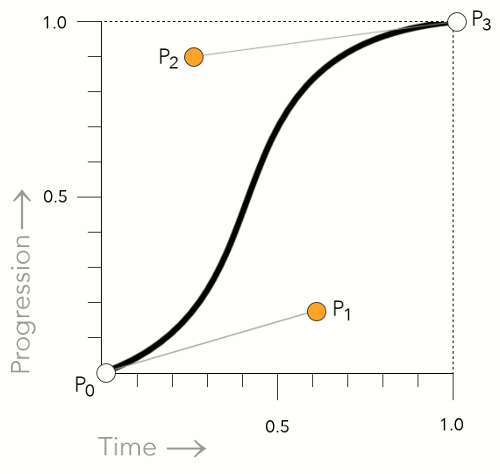
The P0 and P3 control points are always set to (0,0) and (1,1). In other words, they don't move.
However, P1 and P2 can be moved with the Bézier curve timing functions. When using the cubic-bezier() function, you can specify the location of these two control points by using an x and y value. Like this: x1, y1, x2, y2. When using one of the keywords, the keyword uses a predefined set of values (as listed above).
Step Timing Functions
The step-end, step-start, and steps() functions are all step timing functions. The way these work is that they progress the animation in steps — as opposed to a smooth curve like the Bézier curve functions.
Here's more detail on how they work.
Using the step-end Keyword
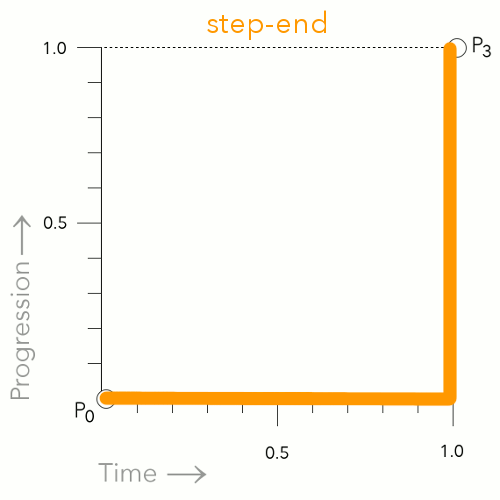
The step-end keyword causes the animation to remain in the start position until the very end. At first, this may appear as though the animation isn't actually working, as the effect won't happen until the end.
Using the step-start Keyword
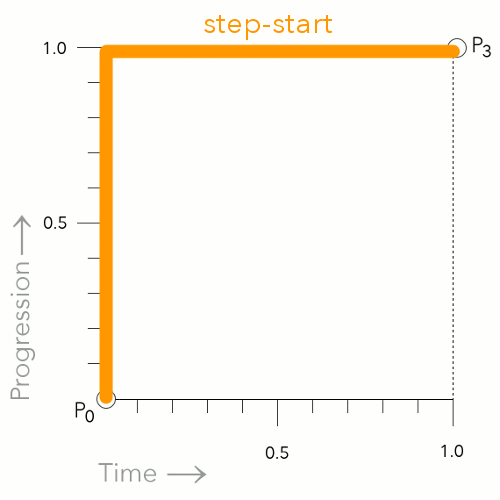
The step-start keyword causes the animation to jump straight to the end position, then remain there until the end of the animation.
Using the steps() Function
steps(5, end)
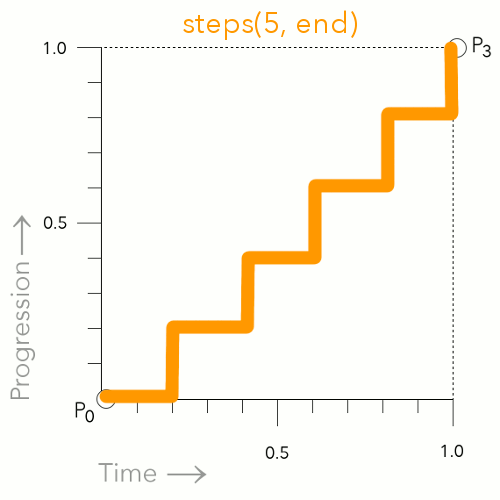
This is an example of using steps(5, end).This breaks the animation up into 5 distinct points. The animation waits, then jumps to the next point at the applicable time (which is determined by how many steps you specify).
steps(5, start)
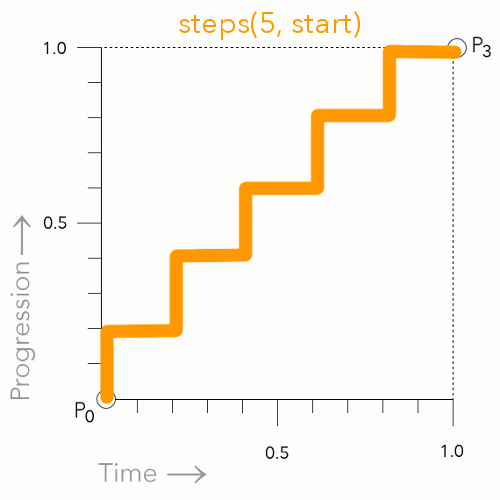
This is an example of using steps(5, start). This is similar to steps(5, end), however, it jumps to the first step immediately instead of waiting for the first time increment.
Basic Property Information
- Initial Value
ease- Applies To
- All elements, and the
:beforeand:afterpseudo elements - Inherited?
- No
- Media
- Interactive
Example Code
Basic CSS
Working Example within an HTML Document
CSS Specifications
- The
transition-timing-functionproperty is defined in CSS Transitions (W3C Working Draft 19 November 2013).
Browser Support
The following table provided by Caniuse.com shows the level of browser support for this feature.
Vendor Prefixes
For maximum browser compatibility many web developers add browser-specific properties by using extensions such as -webkit- for Safari, Google Chrome, and Opera (newer versions), -ms- for Internet Explorer, -moz- for Firefox, -o- for older versions of Opera etc. As with any CSS property, if a browser doesn't support a proprietary extension, it will simply ignore it.
This practice is not recommended by the W3C, however in many cases, the only way you can test a property is to include the CSS extension that is compatible with your browser.
The major browser manufacturers generally strive to adhere to the W3C specifications, and when they support a non-prefixed property, they typically remove the prefixed version. Also, W3C advises vendors to remove their prefixes for properties that reach Candidate Recommendation status.
Many developers use Autoprefixer, which is a postprocessor for CSS. Autoprefixer automatically adds vendor prefixes to your CSS so that you don't need to. It also removes old, unnecessary prefixes from your CSS.
You can also use Autoprefixer with preprocessors such as Less and Sass.